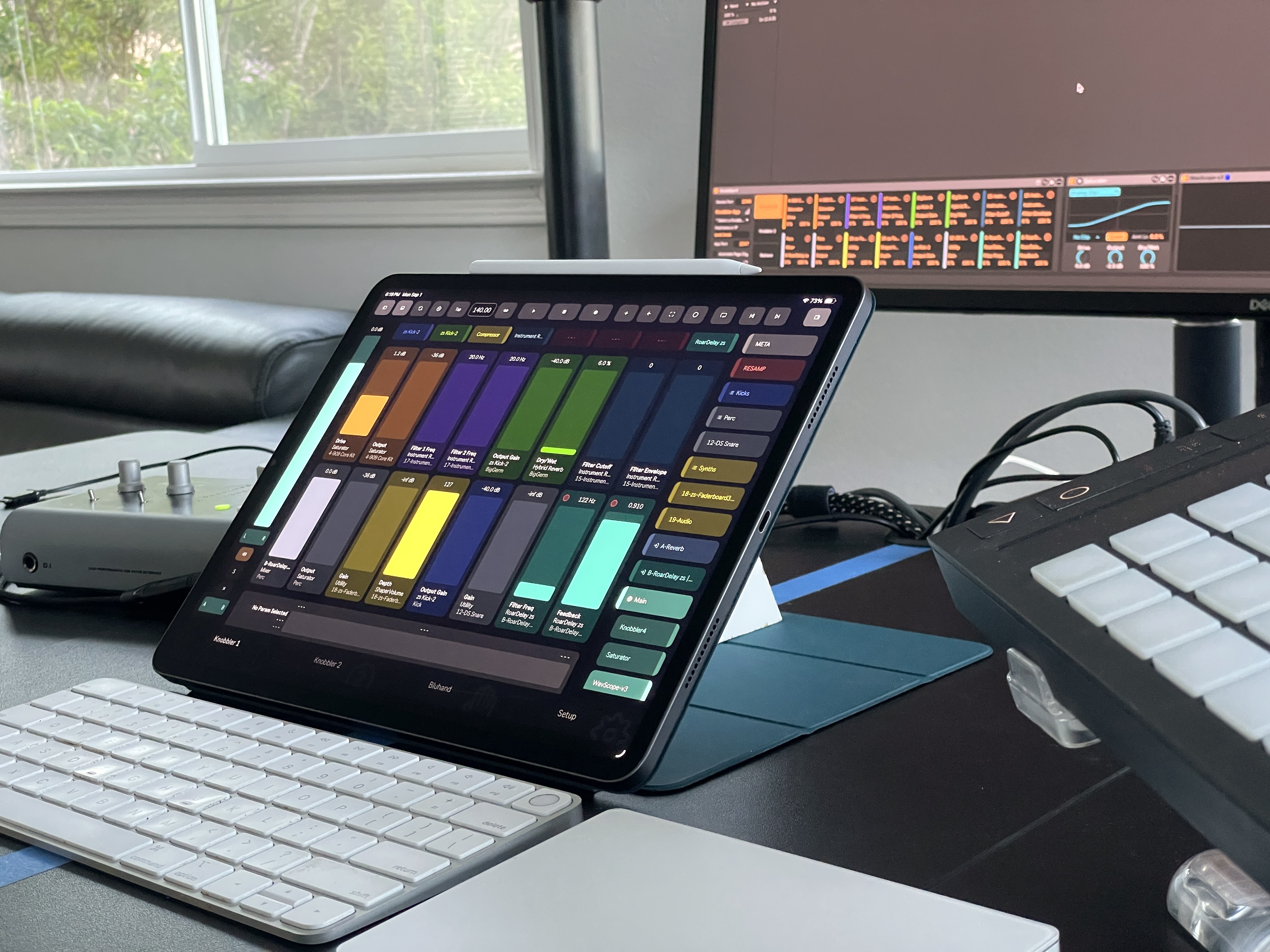
Knobbler4
Download Latestv74 - Button Slots, Variations & Split View Support
Published 4 days ago
All Releases → Visit #knobbler on Discord
Knobbler App Release Notes
These are the release notes for the Knobbler app on your iPad, iPhone or Android device. For the Max for Live device changelog, see the GitHub releases. Notes marked (iOS only) or (Android only) apply to just that platform.
2026.11.6 — November 6, 2026
- A Knobbler slot can now be a button instead of a fader. In Layout mode, set any mapped slot to Momentary or Toggle and it jumps between two parameter values you pick, defaulting to the parameter’s full range. Requires Knobbler4 device v74 or newer
- The Session page is now Split: a two-pane screen where each pane shows the Mixer, Clips, Knobbler or Bluhand — tap the bar at the top of a pane to switch it. Put Knobbler in both panes to keep two pages on screen at once, each pane on its own page
2026.10.21 — October 21, 2026
- USB connections to a Mac are now discovered automatically, so using Knobbler over a cable is as simple as Wi-Fi: plug your iPad or iPhone into the Mac running Live, and the Mac appears a second time under Available devices, marked USB. Tap it to connect through the cable. No IP addresses to look up. USB connections to a Windows computer are not supported; use Wi-Fi there (iOS only)
- USB connections to a Windows computer are now discovered automatically, so using Knobbler over a cable is as simple as Wi-Fi: plug your tablet or phone into the Windows computer running Live and turn on USB tethering in Settings (under Mobile Hotspot and Tethering). The computer appears a second time under Available devices, marked USB. Tap it to connect. USB tethering turns off whenever you unplug, and if connecting says "No response", allow Ableton Live on Public networks in Windows Firewall (see the setup guide). Requires Android 14 or newer. USB connections to a Mac are not supported; use Wi-Fi there (Android only)
2026.10.10 — October 10, 2026
- Put a rack’s macro variations on a Knobbler page (requires Knobbler4 device v74 or newer): on Bluhand, tap the Map button, tap the rack’s variations, then tap a Knobbler slot. Tap a variation to recall it. Once you move a macro it shows an asterisk (“2*”), and tapping it again restores what the variation stored
- On the Clips and Session pages, a scene button blinks while its scene waits to start, just like a launched clip, and the Stop All button blinks while everything waits to stop (requires Knobbler4 device v74 or newer)
- Parameters with many choices, like a delay’s time divisions, stay readable: their buttons keep a comfortable size and scroll when they don’t all fit
- Fix: on phones in landscape, opening a window like Pan & Sends no longer flips the screen to the portrait layout
2026.10.9 — October 9, 2026
- Name your Knobbler pages, and have up to 16 of them per Live set instead of two (requires Knobbler4 device v73 or newer). Tap a page button to switch to it, hold one to rename or delete it, hold and drag it to reorder, and tap + to add a page
- Layout mode, in place of XY Join: tap Layout above the sliders to join or split XY pads. On tablets you can also drag any fader or XY pad to another spot, or hold it at the edge of the screen to move it to another page
- Cue volume on the Main strip (requires Knobbler4 device v72 or newer): the slider just above the Main fader sets Live’s Cue level for your headphones. Double-tap it to reset
- The labels on send, pan and crossfader sliders stay readable at high levels instead of disappearing behind the slider’s fill
2026.10.6 — October 6, 2026
- Smoother and more responsive, especially with large sets: Knobbler now uses much less memory and processing power while meters are running and sliders are moving
- Grab a slider, fader or XY pad while it springs back and it follows your finger right away. Before, it moved a little and then stopped until you lifted your finger and grabbed it again
- New Navigation Panel Width setting on tablets: choose Wide, Normal or Narrow in Setup > Settings
- Live Set Navigation now animates: tracks, devices and chains slide open and closed as you move around your set
2026.9.28 — September 28, 2026
- On tablets, swipe left and right on the Bluhand page to move between parameter banks. Each bank has its own page, so the next bank’s sliders slide into view as you swipe
- Fixed a scroll position that could jump on the first touch after switching pages
2026.9.24 — September 24, 2026
- Parameters with many choices, like a filter type, now show every choice as a button in a scrolling list instead of falling back to a slider
2026.9.22 — September 22, 2026
- Edit your set from Live Set Navigation (requires Knobbler4 device v71 or newer). Long-press a track or chain to rename it or change its color, or a device to rename or delete it. Drag devices to reorder them. Group tracks now fold with the arrow button beside them
- New Plug-in Windows setting (requires Knobbler4 device v71 or newer and Live 12.4.3 or newer): the plug-in window opens automatically as Knobbler moves to a plug-in, and closes when it moves on. Toggle it from the toolbar or Setup > Settings > Device
- Follow Live Selection is now also in Setup > Settings > Device, next to the new Plug-in Windows setting
- Settings stored in the Knobbler device, like Level Meters and Follow Selection, are now greyed out until you connect, so they can no longer flip back on their own when the device connects
- Live Set Navigation shows “No devices” under a track that has none
- Pressing Refresh no longer scrolls the Mixer and Clips pages back to the start
2026.9.14 — September 14, 2026
- Every page is now ready before you open it. Knobbler loads the Mixer, Clips and Session pages in the background after connecting, so even the first switch from Setup is instant
- On big sets, the tracks and clips just off screen are already filled in when you scroll to them, instead of appearing a moment later (requires Knobbler4 device v70 or newer)
2026.9.13 — September 13, 2026
- Fixed a Mixer fader that could get stuck showing -inf after pressing Refresh, even though the track in Live was at a normal level
- Scrolling quickly through a big Mixer or Session page no longer briefly shows the wrong fader or volume on strips coming into view
2026.9.12 — September 12, 2026
- More work on scrolling: the Mixer, Clips and Session pages are now about twice as responsive to your finger. Changing direction mid-drag, or reaching out to stop a moving grid, happens right away instead of a moment later
- Scrolling now uses your device’s own scrolling, so the fling, the slow-down and the bounce at the edges feel like everything else on your device
- Faders and sliders respond more immediately, especially on a busy set with meters running
2026.9.9 — September 9, 2026
- Big sets scroll dramatically faster. The Mixer, Clips and Session pages no longer rebuild their contents as you scroll, so panning stays smooth with 50+ tracks
- Mixer strips now appear the moment the page opens instead of filling in a moment later
- Fixed a freeze that could happen when scrolling quickly back and forth on a large set
2026.8.31 — August 31, 2026
- Knobbler keeps working after the trial ends. The Knobbler and Bluhand pages, Device Shortcuts and Current Param are now free forever — the same set the original TouchOSC template had
- The Mixer, Clips, Session and Live Set Navigation pages come with the paid version and now show a on their tab. They stay fully usable during your trial
- Knobbler is now free to download with the same 30-day trial. If you already bought it, you keep everything — no action needed (Android only)
- Full Screen is now on by default, for more room to play. Turn it off in Setup > Settings if you want the status bar back
2026.8.12 — August 12, 2026
- Reorder your Device Shortcuts (requires Knobbler4 device v70 or newer) — tap the Map button, tap a shortcut button to pick it up, then tap another shortcut to swap the two devices (or an empty button to move it there)
- If you already own Knobbler and are ever asked to purchase it again, the purchase screen now has an “Already bought Knobbler?” link that walks you through getting your access back
2026.8.4 — August 4, 2026
- Track Width: long-press the Width button in the toolbar and slide left or right to resize the track columns on the Mixer, Session, and Clips pages — whatever is in the middle of the screen stays put as they resize. Double-tap the panel to return to 100%; your setting is remembered
- New Scroll Lock setting (Setup > Settings > Mixer): when on, a fader drag on the mixer page can no longer slip sideways into an accidental left/right pan
- Fix: on the Clips page, the empty area beside a grid with only a few tracks can now be dragged to scroll
2026.6.17 — June 17, 2026
- Clip progress now appears on the Session page too — playing clips show the same phase pie, play count, and loop length as the Clips page (requires Knobbler4 device v68 or newer)
- Fix: the What’s New window now scrolls on phone
- Fix: a recording clip now shows its growing length (bars.beats.16ths) like Live, instead of a huge number
- A clip slot triggered to record now pulses its border until recording begins (even with the transport stopped), like Live, requires device v68 or newer
2026.6.15 — June 15, 2026
- Live clip progress (requires Knobbler4 device v67 or newer) — playing clips show a phase pie that fills as the clip plays, along with the current beat and play count; clips with a pending stop flash until they actually stop
- Setup ▸ Connection redesigned for a clearer, simpler connection flow
- Mixer track-name headers now match the text color and height of the track buttons in the side nav, with return and main tracks showing their icons
- The Tips popup can now be dragged around the screen, with a swipeable tip carousel
- Page nav now adapts to smaller tablet screens and windows — tab labels no longer overflow or clip into one another on narrower layouts
- Fixes: X-Y pad halves that straddle two rows now render instead of disappearing; X-Y pad gradients refresh correctly on rotation and resize
2026.6.2 — June 2, 2026
- Instant page switching, now even on the largest sets — moving between the Knobbler, Bluhand, Mixer, Session, and Clips pages is immediate no matter how big your Live set is
- Volume fader now mirrors Ableton Live's fader exactly — the handle sits at the same height as Live's fader at every level
- Fix: Tempo box now works — long-press and slide to nudge the tempo, or tap to type a value (Android only)
- Many more reliability and performance enhancements making this the best Knobbler yet!
2026.5.25 — May 25, 2026
- Multiplayer Knobbler (requires Knobbler4 device v64): tap the “Follow Sel” button in the toolbar to unlock a surface from Live's selected track and device so it navigates on its own — run an instance per tablet and each can control a different track and device at the same time
- Tempo nudge: long-press the Tempo box and slide left or right to change the tempo in 1 BPM steps (a quick tap still opens it for typing)
- Fix: clip launching touch sensitivity (Android only)
- Fix: bluhand parameter mapping no longer cancels its own selection on tap
2026.5.24 — May 24, 2026
- Swap or move a mapping between knobbler slots (requires Knobbler4 device v62) — tap the Map button, tap a mapped slot, then tap another slot to swap the two mappings (or move it, if the target slot is empty)
- Two-phase mapping redesign: everything mappable outlines green, and the picked source pulses in time with the music so it’s always clear which slot you’re mapping from
- Cue Points modal (requires Knobbler4 device v63): live transport position with scrub, set the arrangement loop points, plus add and rename cue points right from the app
- Fixes: slider drag no longer lost when you pause before sliding; mixer sliders no longer stick at the wrong value; variation button alignment and segmented-control selected-text contrast
2026.5.19 — May 19, 2026
- Mixer-to-knobbler mapping (requires Knobbler4 device v60) — tap the Map button, then tap any mixer (volume / pan / sends / mute / crossfader) or bluhand source, then tap a knobbler slot to complete the mapping
- Page tabs can now be placed at the top or bottom of the screen (Setup → General)
- Full Screen setting hides the status bar for max screen real estate
- Mapping outline now flashes in time with the song tempo
- Mixer sidebar restyled to match the main mixer strip
- Auto-discovery shows your device IP next to the Connection headline for easier debugging
- Many UI refinements: standardized border radii, tighter clip rows, cleaner channel strips
- Fixes: mixer page now shows active channels immediately on first open; tapping a green-outlined bluhand slider in mapping mode correctly selects it as the source
2026.5.11 — May 11, 2026
- Instant page switching — Knobbler, Bluhand, Mixer, Session, and Clips pages stay loaded and switch with no perceptible delay
- Free trial extension granted to expired-trial users — 30 more days to check Knobbler out again
- Render coalescing tuned to collapse OSC burst replies into a single frame
- Many small UI and UX improvements and fixes.
2026.5.5 — May 5, 2026
- Push 3 Standalone support — one-tap connect to push.local on shared Wi-Fi, or 192.168.0.1 in Push hotspot mode
- Improvements to connecting and testing connections
- Buttons and clips no longer fire on touch-down — drags now correctly start scrolling/panning even when your finger lands on a button
- Spring animations now synced to display refresh for smoother motion
- Improvements to graphics rendering speed
2026.4.27 — April 27, 2026
- Draggable ghost — long-press the origin indicator during a spring animation to drag the target in real-time
- Tap the spring icon on any animating control to open the release settings overlay
- Release animations now survive tab switches seamlessly
- Batched OSC sends during animations for lower network overhead
- XY pad dot clamped to pad bounds during spring overshoot
- Tapping Knobbler in the nav bar toggles between page 1 and 2
- Bigger XY pad touch dot
2026.4.22 — April 22, 2026
- Release modes: time (with easing), rubber band, and gravity — expanding beyond spring-only
- Release animations persist when navigating away and resume on return
- Ghost indicator shows touch start position on all sliders with fade animation
- Connection test retries automatically instead of hanging
- Fixed light mode button text visibility
2026.4.20 — April 20, 2026
- Adjustable spring duration — long press the Spring button to open a draggable slider (1ms to 100s)
- Silky smooth sliders — gesture handling moved to the GPU for native framerate response
- Faster OSC communication with leading-edge coalesced sends
- Spring mode remembers its target when re-touching during spring-back
2026.4.16 — April 16, 2026
- New Spring (momentary) mode — touch any slider or X-Y pad, drag, release to spring back to its original value
- Tap any text below a slider to select that track on Knobbler pages, not just the track name
- Tempo display always shows 2 decimal places
- Fixed crash from invalid color values
2026.4.11 — April 11, 2026
- What's New page in Setup and popup on version update
- Typography improvements
- Light mode volume slider tick marks
- Faster startup and smoother animations
- Fixed Cue Points dialog (Android only)
- Visual gap above return tracks and main track in nav
- Consistent feeling clips panning between Clips and Session pages
2026.4.7 — April 7, 2026
- Buttons now support multitouch — tap buttons while using sliders
- Feedback tab is now always accessible from Setup
2026.4.3 — April 3, 2026
- Auto, Light, and Dark appearance modes
- Remembers your last page across app restarts
2026.3.31 — March 31, 2026
- Knobbler Tips page with usage tips and tricks
- Long press the help button to jump to Tips
- Fixed nav panel width on iPad resize
2026.3.29 — March 29, 2026
- Session page with combined clips and mixer view (iPad)
- Scene overview bar with tap and pan navigation
- Clip and scene long press actions (rename, color, delete)
- Transport controls beside session mixer
- Restore Purchases button on phone
2026.3.27 — March 27, 2026
- Fixed purchases not syncing across devices
2026.3.26 — March 26, 2026
- Fixed a crash when receiving certain messages
- Stop button for empty clip slots
- Fixed toggle controls not reflecting current state
2026.3.25 — March 25, 2026
- Improved clips grid scrolling on iOS
- Support for one-tap connection
- Auto-discovery results sorted by address
2026.3.24 — March 24, 2026
- Smoother clips grid scrolling with GPU acceleration
- Fixed solo muting for return and main tracks
- Muted channels show subtle meter colors
- Consistent touch target sizes across the app
- Fixed pan slider in sends modal
2026.3.1 — March 1, 2026
- Phone layout overhaul — unified pages, swipeable mixer sidebar
- Toolbar toggle button on all page nav bars
- Auto-polling device discovery (no more refresh button)
- Long press pan knob to open sends modal
- Nav panel stays on clips/mixer when tapping tracks
- Selected track auto-centers on clips and mixer pages
2026 Q1
- Mixer page with multi-track channel strips, volume meters, and track overview bar with drag-to-navigate
- X-Y pad with join/split UI, automation indicators, and two-finger precision mode
- Batched OSC protocol for lower network overhead and faster slider response
2025 Q4
- Multi-button support with quantization toggle — buttons now execute multiple actions
- Improved Bluhand title hit targets and gesture responsiveness
- Tempo edit bug fixes and UI refinements
2025 Q3
- In-app purchase model with free trial on iOS
- Group track expand/collapse via long-press with visual feedback
- Tablet and phone layout refinements including larger toolbar buttons and responsive margins
2025 Q2
- Current Param display — see the active parameter name and value at a glance
- Variations support for Ableton Live instruments
- Device port configuration
2025 Q1
- Knobbler and Bluhand pages with banks and shortcuts for hardware control mapping
- Auto-discovery of Ableton Live instances on local network with tap-to-connect setup flow
2024 Q4
- Knobbler OSC app for controlling Ableton Live
- Slider controls with real-time OSC-based modulation
Download Latestv74 - Button Slots, Variations & Split View Support
Published 4 days ago
All Releases →