 USB Scrubber
Download Latestv1 - Initial Release
Published 9 months ago
All Releases →This is a Max For Live device that lets you use a USB Human Interface Device knob to scrub the playback position in Ableton Live's Arrangement view.
Installation
Use a download link at the top or bottom of this page, or download the newest .amxd file from the latest GitHub release or clone this repository, and drag the USBScrubber.amxd device into a track in Ableton Live.
USB Setup
NOTE: I have tested this in "iD" mode of my Audient iD14. I have no idea if it will work with other devices, so I'm just taking a good guess here with configuration / configurability.
Mapping process:
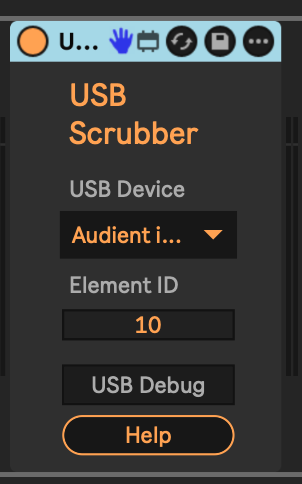
- Choose your USB device from the drop-down.
- Enable
USB Debugmode to print data received from that device in the Max console. To see the console, right-click the title bar of this device and chooseOpen Max Window. - Move whatever controller you want to use.
- Note the output in the Max console window. The output is
{element} {value}.- My iD14 knob outputs as element 10, so that's why it is the default.
- Change the
Element IDfield to the element your controller is emitting. - ... at this point the controller should be able to scrub along the timeline in Arrangement view.
Usage
Turn the USB knob in one direction or another to scrub the playback position in Arrangement view.
Changelog
- 2022-04-09 - v1 - Initial Rev
TODO
- ...
Download Latestv1 - Initial Release
Published 9 months ago
All Releases →